November 27, 2011

 Minus - 10 GB Free Online Storage Space + 1GB Every Referral

Minus.com - 10 GB Free Online Storage Space - File Sharing Service:
Minus is yet another new online storage service that allows users to upload, publish and discover photos, docs, music, videos and more via the browser, desktop and mobile.  The cool part is they give you a very useful 10GB of free space (1GB additional for each referral up to 50GB) with 2GB file size limit and Unlimited downloads. It is useful to backup your important files, documents and access or share it later. The service doesn’t inflict any limitation in the time of subscription and bandwidth.


To share files from a desktop computer all you need to do is drag and drop a file onto a browser window, and the file automatically uploads. Once the uploading process is completed, instantly get a link to share them with family or friends, but I highly recommend you first Create Account in less than minute doesn’t even require an email. Once you do you’ll see your dashboard, containing all the folders you’ve uploaded. Uploading an extra files, or collection of files, is as simple as dragging it or them from your computer’s browser to your web browser window. Drag and drop multiple files and Minus will take care of the rest, uploading the files for you and putting them in their own folder. You can track what is and what isn’t uploaded yet easily.


Features of Minus:
  • Easy signup
  • Get 10 GB of free space
  • Upload files up to 2 GB
  • Unlimited Downloads and Transfer
  • Publish and share your files and folders (Ex: http://minus.com/myfiles)
  • Follow friends to see what they are sharing
  • Allows anonymous uploading and all files and folders
  • Invite friend and get extra space of server 1GB for each, up to 50GB.
  • Keep all files indefinitely unless deleted by the uploader.

I hope you enjoy it and find it useful to you.


Search Terms : Minus.com, Drag and drop file sharing, Drag-drop and share files with Minus.com, 10 GB Of Free Storage, File sharing service Min.us moves to Minus.com, Online Storage, 10 Gig Free Account, 10GB free online space, Social file-sharing app, Cloud File Sharing Service, mobile developers and desktop app developers, dropbox, free file sharing platform online, Share Files Online, referral up to 50GB, Unlimited transfer, Upload and Download, Publish your files, Free 10GB Storage with 2GB File Upload limit, share files from a desktop computer, dropbox.com, Min.us,

Category: Miscellaneous
Minus.com

July 29, 2011

 How to Disable USB Mass Storage Devices


How to Disable or Enable access to USB Storage Devices

A common security anxiety at organizations allows users to connect a USB flash drive, because it can so easily copy the data. You can completely disable USB devices on writing, using a simple trick to disable USB devices. You must ensure that users are not administrators on the computer, for the reason that they can easily modify this setting back.

Follow the steps given below to disable the access to USB devices
First Click Start Button >  Click Run.
In the Run box, type regedit and then click OK.
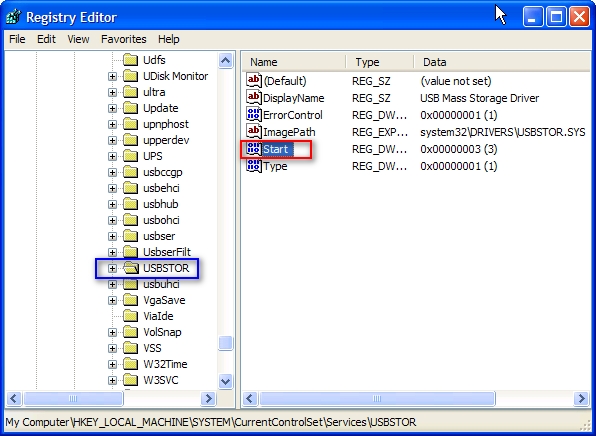
Then locate the following key in the registry
HKEY_LOCAL_MACHINE\SYSTEM\CurrentControlSet\Services\USBSTOR


In the right side panel, double click on the value start then set it a Hexadecimal value data 4.
And then click OK. (The default value is 3)


If you want to re-enable the USB ports set it a Hexadecimal value data 3.
Close the registry editor.
You'll need to reboot your computer before the changes take effect.
This trick will works on Windows Vista as well.

That's all.

CAUTION! : It is recommends that before you attempt to use the registry editor, make sure that you back up the whole registry or export the registry keys in the registry that you plan to edit. Incorrectly editing the registry may damage your system. Use Registry Editor at your own risk, we cannot guarantee that you can solve problems that result from using Registry Editor incorrectly.

Category: Registry Tweaks
Operating System : Windows

December 29, 2010

 Floppy Drive


Floppy drives are most advanced storage devices and it reads and writes data on floppy disks. Floppy Drive connects to the motherboard with a ribbon (data) cable and also power cable attached to it. Presently new computers do not have this floppy drives because USB flash drives and optical drives have replaced floppy drives in newer systems, it can be added internally to your computer (or) externally with a USB cable. It is a removable media or removable drive you can remove whatever disk is currently in the drive, and replace with another.

October 28, 2010

 Storage Devices


Secondary storage is also known as auxiliary memory or external memory or back up storage. The secondary storage devices are used in most computer systems to supplement the limited storage capacity of the primary memory section. This is similar to our keeping a diary or a note book when our memory is incapable of storing many facts and figures. We refer to our diary whenever we need the data.

Secondary Storage Devices are
1. Magnetic tape
2. Magnetic disks
3. Compact Disk Read Only Memory (CD-ROM)
The data is either stored or erased by laser beam to CD-ROM.

- - - - - - - - - - - - - - - - - - - - - - - - - - - - - - - - - - - - - - - - - - - - - - - - - - - - - - - - - - - - - 

Magnetic Tape:
Magnetic tap is one of the most popular storage medium for larger data that are sequentially accessed and processed. The tape is plastic ribbon usually 1/2 inch wide that is coated as one side with magnetic material. It is similar to the tape used on a tape recorder except that is higher quality and more durable.

Advantages
(a) Unlimited Storage Capacity
(b) Low Cost
(c) Portability

- - - - - - - - - - - - - - - - - - - - - - - - - - - - - - - - - - - - - - - - - - - - - - - - - - - - - - - - - - - - - 

Magnetic Disks :
A magnetic disk is a, circular plate coated on both sides with a magnetic material. It is very similar to a gramophone record. Each disk consists of a number of invisible concentric circles called tracks. Each track is further sub-divided into sectors. Information is recorded on the tracks of a disk surface in the form of invisible tiny magnetic spots. The presence of a magnetized spot is represents as '1 ' bit and its absence represented a '0' bit.

Magnetic disks are two types:
1. Floppy Disk
2. Hard Disk

- - - - - - - - - - - - - - - - - - - - - - - - - - - - - - - - - - - - - - - - - - - - - - - - - - - - - - - - - - - - - 

Floppy Disk:
The floppy disk is a flexible, circular shaped medium with a magnetic coating on it. It is sensitive to touch and dust. A floppy disk enclosed in a leather jacket to protect it from external damage and dust.

There are three types of floppy’s available.
1) 3.5" Floppy Disk ( Capacity 1.44 Mb ) introduced : Sony
2) 5.25" Floppy Disk ( Capacity 1.2 Mb ) introduced : Shugart
3) 8.0" Floppy Disk ( Capacity 100 Kb ) introduced : IBM

The 3.5" disks are the most popular and commonly used.

On the Basis of Capacity they are of two types:
(a) High density
(b) Low density

- - - - - - - - - - - - - - - - - - - - - - - - - - - - - - - - - - - - - - - - - - - - - - - - - - - - - - - - - - - - - 

Hard Disk:
Hard Disk is also a secondary storage device. The hard disk storage system was developed to reduce the problem of diskettes frequently getting damaged.

Hard disks come in different capacities. The minimum capacity is generally twenty times that of a high density floppy disk in terms of storage capacity. The hard disk is generally fixed inside the computers.

- - - - - - - - - - - - - - - - - - - - - - - - - - - - - - - - - - - - - - - - - - - - - - - - - - - - - - - - - - - - -  

Compact Disk Read Only Memory (CD-ROM):
CD-ROM disks are made of reflective metals. CD-ROM is written during the process of manufacturing by high power laser beam. The storage density is very high, cost is very low and access time is relatively fast.

- - - - - - - - - - - - - - - - - - - - - - - - - - - - - - - - - - - - - - - - - - - - - - - - - - - - - - - - - - - - -  

Input/Output:
The term Input/Output is used to describe any program, operation or device that transfers data to or from a computer and to or from a peripheral device. Every transfer is an output from one device and an input into another. Devices such as keyboards and mouse are input-only devices while devices such as printers are output-only. A writable CD-ROM is both an input and an output device.

Input Devices:
Input device is a hardware device which is use to input data, image, and video to the computer.

Input Devices:
Digital camera
Keyboard
Microphone
Mouse
Scanner
Web Cam
Light pen
Joy stick
Etc.
- - - - - - - - - - - - - - - - - - - - - - - - - - - - - - - - - - - - - - - - - - - - - - - - - - - - - - - - - - - - - 

Out put Devices:
Output device is a hardware device which is use to receives or displays output from a computer

Output Devices:Monitor
Printer
Plotter
Speaker
Projector
Etc.


Search Terms : it solutions, disk drive, hard disk, device, device driver, io devices, device driver, tape in, what is a storage device

Your Ad Here