


 How to Disable USB Mass Storage Devices

How to Disable or Enable access to USB Storage Devices
A common security anxiety at organizations allows users to connect a USB flash drive, because it can so easily copy the data. You can completely disable USB devices on writing, using a simple trick to disable USB devices. You must ensure that users are not administrators on the computer, for the reason that they can easily modify this setting back.
Follow the steps given below to disable the access to USB devices
First Click Start Button > Click Run.
In the Run box, type regedit and then click OK.
 Then locate the following key in the registry
HKEY_LOCAL_MACHINE\SYSTEM\CurrentControlSet\Services\USBSTOR
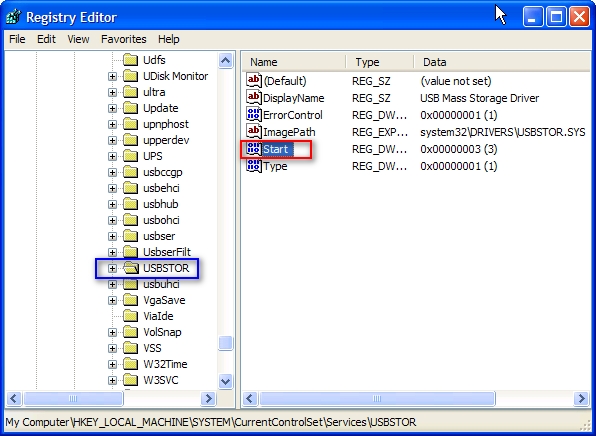
In the right side panel, double click on the value “start” then set it a Hexadecimal value data 4.
And then click OK. (The default value is 3)

If you want to re-enable the USB ports set it a Hexadecimal value data 3.
Close the registry editor.
You'll need to reboot your computer before the changes take effect.
This trick will works on Windows Vista as well.
That's all.
CAUTION! : It is recommends that before you attempt to use the registry editor, make sure that you back up the whole registry or export the registry keys in the registry that you plan to edit. Incorrectly editing the registry may damage your system. Use Registry Editor at your own risk, we cannot guarantee that you can solve problems that result from using Registry Editor incorrectly. |
Category: Registry Tweaks | Operating System : Windows |


